IN-STORE EXECUTION

In-store POP material, documented and verifiable.

Metrix coordinates agencies, field installers and photographic evidence of POP material across more than 20,000 points of sale. Your organization has verifiable information on what was installed, where, when and in what condition.

Countries
6
Retail chains
6
Points of sale
+20,000
RECENT EVIDENCE

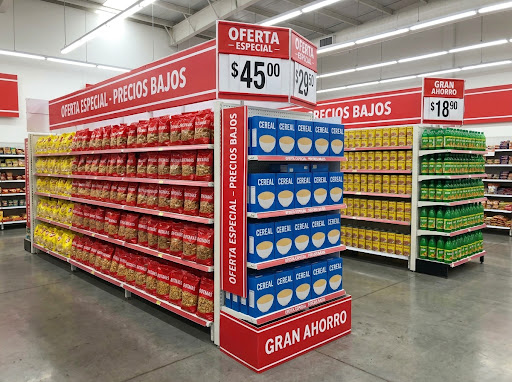
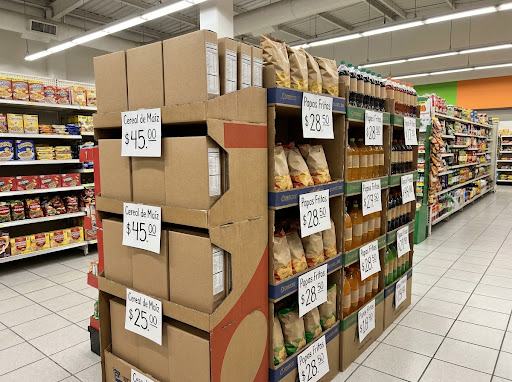
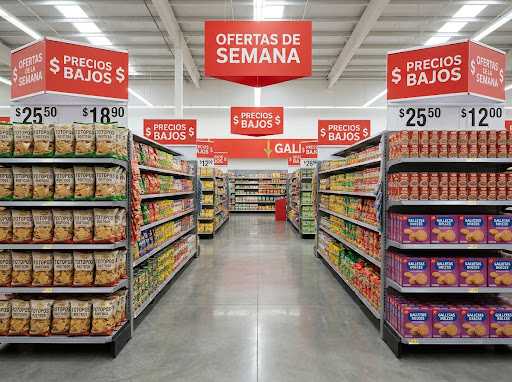
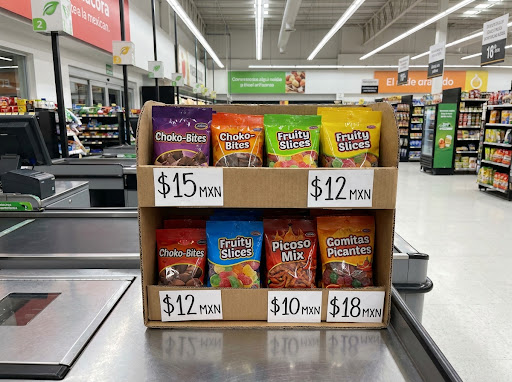
Every photograph is tied to store, campaign, date, time and location.

Cardboard floor display stocked with product, store 0863
STORE 0863 · León, GTO
campaign Back to school
schedule Aug 24, 2026 · 9:18 AM
location_on 21.1250, -101.6860
check_circle Evidence validated
Hanging promotional signage in the aisle, store 1592
STORE 1592 · Mérida, YUC
campaign Back to school
schedule Aug 23, 2026 · 5:05 PM
location_on 20.9670, -89.6237
check_circle Evidence validated
Display in the checkout lane, store 3041
STORE 3041 · Tijuana, BC
campaign Back to school
schedule Aug 23, 2026 · 2:27 PM
location_on 32.5149, -117.0382
check_circle Evidence validated
WHAT METRIX DOES

Every POP installation, verified and evidenced.

Between the brand’s work order and the installation of POP material in store there are agencies, field installers and many metro areas in between. Metrix turns that stretch into measured information: every visit leaves a record, and every record updates campaign progress as it happens.

View a campaign dashboard
01

Progress as it happens

Every capture by the field installer updates campaign progress instantly. The summary is no longer compiled by hand.

Instead of reports that arrive days late.

02

Evidence with traceability

Every photograph arrives stamped with store, date and location. Evidence is audited one by one, without relying on anyone’s word.

Instead of images sent through informal channels.

03

Quantified coverage

The percentage of stores actually served during the period is a measured figure, with the detail of what is missing and where.

Instead of an estimated figure.

04

A single store list

Brand, agency and field installer work from the same list and the same store naming.

Instead of three lists that do not reconcile.

HOW IT WORKS

From a master file to auditable evidence.

STEP 01

Master file upload

The file becomes campaigns, stores and periods. The system validates the information and shows the changes before applying them; uploading the same file again does not create duplicates.

idempotent import · preview
STEP 02

Assignment of the operation

Each agency has its own assigned stores. As it registers its field installers, the agency–store–person mapping is generated automatically.

agencies · field installers · automatic assignment
STEP 03

Evidence capture

The field installer records the evidence from the mobile app at the point of sale. Each file is tied to store, campaign, date, time and location, with deferred sync in areas without signal.

mobile app · time and location stamp
STEP 04

Review and reporting

Dashboards, a coverage map and exportable reports. Each area sees only the modules and data that correspond to it.

dashboard · map · export
THE DASHBOARD

This is what a campaign in progress looks like.

A single dashboard with the status of every store in the country where the campaign runs — Mexico, in this example —: what was installed, what has an issue and what is still pending. The figure updates as the field installer captures in store.

Summer campaign · National chain As of August 31 · 64 metro areas · 5,000 stores
Updated 4 minutes ago
Campaign stores 5,000 Authorized store list
Installed 4,933 98.7% coverage
With an issue 25 Material damaged or refused
Out of stock 30 Store has no stock
Pending 12 Visit scheduled
Coverage in Mexico
27487stores by state Metro area up to date With an issue Out of stock
Campaign stores by stateCDMX: 412 storesMonterrey: 289 storesGuadalajara: 266 storesEcatepec: 238 storesTijuana: 148 storesPuebla: 124 storesCd. Juarez: 113 storesLeon: 97 storesChihuahua: 96 storesQueretaro: 92 storesHermosillo: 88 storesMerida: 86 storesTorreon: 84 storesCuliacan: 79 storesSan Luis Potosi: 78 storesMexicali: 74 storesCancun: 74 storesAguascalientes: 71 storesVeracruz: 68 storesSaltillo: 66 storesMorelia: 63 storesToluca: 61 storesAcapulco: 58 storesTampico: 57 storesDurango: 55 storesVillahermosa: 54 storesMazatlan: 52 storesOaxaca: 52 storesTuxtla Gutierrez: 49 storesReynosa: 48 storesCd. Obregon: 45 storesCuernavaca: 44 storesLos Mochis: 42 storesXalapa: 42 storesLa Paz: 41 storesIrapuato: 41 storesMatamoros: 39 storesEnsenada: 38 storesPachuca: 38 storesTepic: 37 storesPlaya del Carmen: 36 storesPto. Vallarta: 35 storesZacatecas: 34 storesLos Cabos: 33 storesCampeche: 33 storesNuevo Laredo: 31 storesCoatzacoalcos: 31 storesNogales: 29 storesUruapan: 29 storesCd. Victoria: 28 storesColima: 27 storesTapachula: 27 storesMonclova: 26 storesCordoba: 26 storesCd. del Carmen: 24 storesTlaxcala: 23 storesDelicias: 22 storesChetumal: 22 storesManzanillo: 21 storesChilpancingo: 21 storesPiedras Negras: 19 storesSan Cristobal: 18 storesLazaro Cardenas: 17 storesSalina Cruz: 16 stores

Scroll the map to see it in full.

State boundaries by INEGI codes. The shading indicates how many campaign stores are in each state; each dot is one of the 64 metro areas, sized by its number of stores.

Leading metro areas
Mexico City412 · 100%
Monterrey289 · 99%
Guadalajara266 · 99%
State of Mexico238 · 98%
Puebla124 · 97%
Tijuana148 · 96%
Needs attention
Nogales3 issues
Uruapan5 issues
Tapachula4 issues
Delicias7 out of stock
Tlaxcala6 out of stock

Figures from a sample campaign, for illustration only.

MODULES

One platform, different operating fronts.

Each module has its own permissions and dashboards. Activation is configured per client and per area, without affecting the rest of the platform.

Module 01 Available

POP material

Point-of-purchase (POP) material: campaign setup, store assignment, installation and photographic evidence of the build.

  • campaigns and periods
  • assignment by agency
  • geotagged evidence
  • exportable report
In preparation

Retailtainment

Coming soon

In-store activations and experiences: scheduling, floor staff and results reporting by event.

Parking areas

Coming soon

Outdoor spaces and the store perimeter, under the same evidence and follow-up model.

ROLES

Three roles, a single source of information.

BRAND / RETAILER

Operational autonomy

  • remove Direct upload of the master file
  • remove Real-time progress by campaign and region
  • remove Evidence available for audit
  • remove Reports available on demand
AGENCY

An orderly operation

  • remove Field installers registered in minutes
  • remove Stores assigned and prioritized
  • remove Pending work visible before the period closes
  • remove Documented performance
FIELD INSTALLER

Simplified field execution

  • remove The day’s store schedule on the device
  • remove Capture guided by type of evidence
  • remove Works in areas without signal
  • remove No additional reports
SECURITY AND OPERATIONS

Effective isolation of each client’s information.

Isolation does not depend on the interface: it is enforced in the database. A malformed query does not return another client’s information.

Isolation by client

Every query runs under the context of the client in session, with policies enforced in PostgreSQL.

Permissions by area

Roles scoped to internal, client and agency. Without the corresponding permission, the module does not appear in the menu.

Second factor

Two-step verification through an authenticator app and backup codes, enforceable per client.

Traceability

A record of who uploaded, corrected and approved each action, with a timestamp. Evidence cannot be modified without leaving a trace.

Managed infrastructure

Deployed on Google Cloud, with backups and automatic scaling according to campaign load.

Public status

An independent status page reporting service availability, measured from outside.

See the platform with a sample campaign.

A 30-minute demonstration with real data from a sample campaign. No installation required.

Request a demo